Viral taxonomy and phylogeny II
Overview
Teaching: 210 min
Exercises: 0 minObjectives
Create a viral phylogeny based on the terL gene
What kind of phages exist in your dataset?
For this task, we will first build a phylogenetic tree using the terL marker gene.
TerL phylogenetic tree
The terminase large subunit is a widely used marker gene for phages. This protein packages the DNA into an empty pro-capsid. It has two parts: 1) an ATP driven motor for viral DNA translocation and 2) a endonuclease to cleave the viral DNA to signal the end of the packaging reaction, once the capsid is full. TerL is quite essential in the assembly of full icosahedral capsids, and therefore makes a good marker gene for the Caudoviricetes order. Consider also that some phages do not require, and therefore, do not encode a terL gene.
Basics of making a tree
- Start with amino acid sequences in a fasta file
- Make a multiple sequence alignment (MSA) - this identifies biologically informative positions for tree inference
- INSPECT your MSA - you might need to trim poorly aligned columns
- Build a tree - there are several tree building algorithms - we will use maximum likelihood
Exercise - Make a terL phylogenetic tree with your sequences
For this exercise, we will use the ICTV reference phages. We have extracted the terL amino acid sequences from the ICTV reference phages using pharokka, and pre-built a multiple sequence alignment. You will have to add your sequences to this alignment using mafft and then trim the alignments using trimAl and build a tree using FastTree 2. The solution sbatch script at the bottom of the tree-making section includes all the tree-making steps.
To get a fasta file of your terL amino acid sequences (output by Pharokka) and locate the pre-built MSA
# location of the terL sequences from pharokka output
./1.4_annotation/10_pharokka/terL.faa

# location of the reference pre-built MSA
/vast/groups/VEO/shared_data/Viromics2025_workspace/data/alignments/terL_ICTV_ref_phage_alignment.fasta

# copy the terL alignment to your own directory
mkdir -p viromics/data/alignments   # make a directory if it doesn't exist
cp /vast/groups/VEO/shared_data/Viromics2025_workspace/data/alignments/terL_ICTV_ref_phage_alignment.fasta viromics/data/alignments
To add your terL sequences to the reference alignment using mafft. You need the following command and it will take ~22min
/home/groups/VEO/tools/mafft/v7.505/bin/mafft --reorder --keeplength --addfragments contigs_terL.fasta reference_alignment.fasta > new_MSA.fastaTo trim your alignment using TrimAl (-gappyout)
trimal -in new_MSA.fasta -out new_MSA_trimmed.fasta -gappyoutTo build a tree using FastTree.
/home/groups/VEO/tools/fastTreeMP/v2.1.11/FastTreeMP -lg -pseudo < new_MSA_trimmed.fasta > new_MSA_trimmed.tree

# -lg : Uses the LG model. Note: the LG model is an updated model that describes how likely it is that one amino acid is replaced by another based on patterns found in real protein families. The default model for Fasttree is the JTT - which is older but similar model.
# -pseudo : Adds pseudo counts (for gappy alignments)
TerL tree outputs
Phylogenetic trees come in several output types but here the above commands produce a tree in a newick format. This is a text file and you can open it with any text editor to see what it looks like. It takes the shape: (A:0.1, B:0.2, (C:0.3, D:0.4)E:0.5)F;
The final terL tree might look something like this:
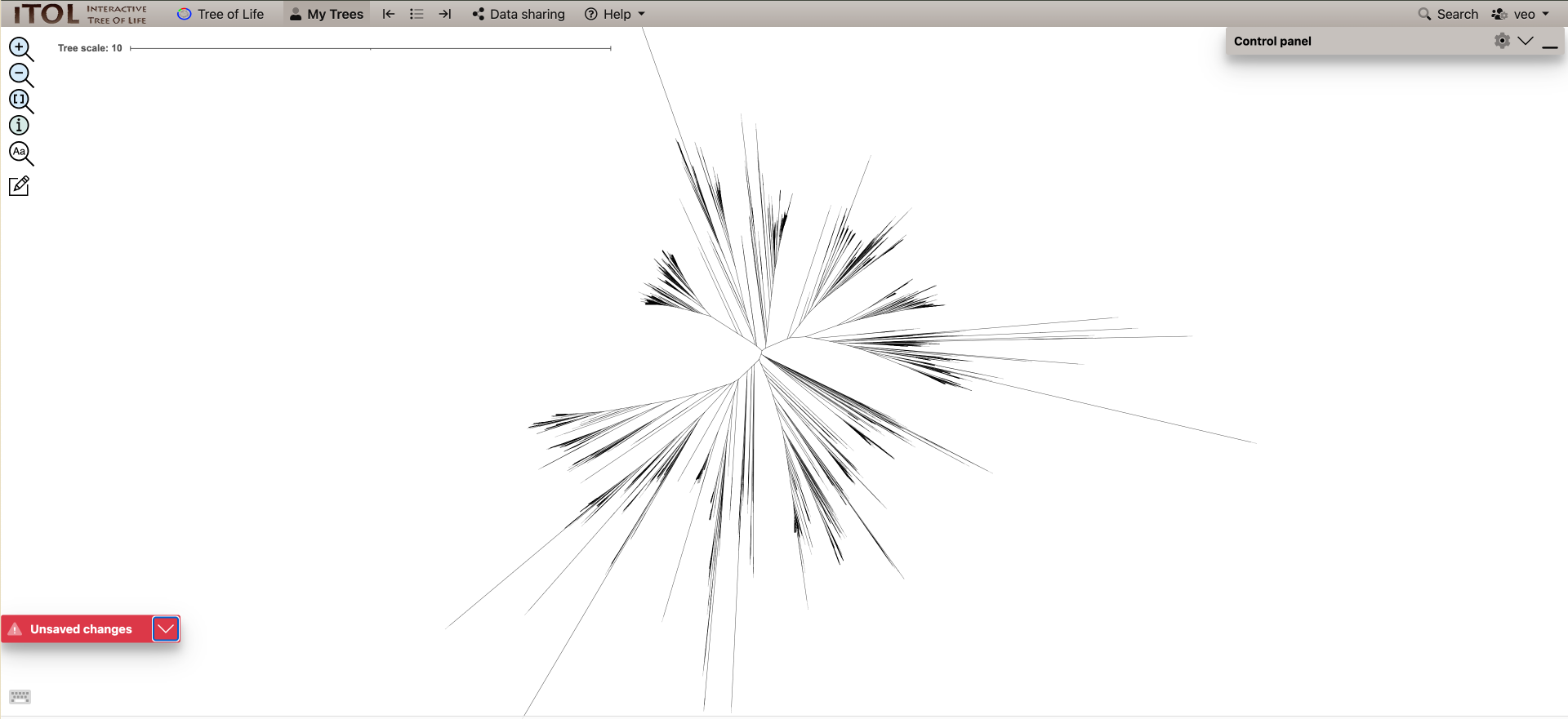
This .tree file can be opened with dendroscope (if you downloaded it locally) or iTOL or another tree-visualization software HOWEVER the full terL tree we will produce will have 5000+ leaves, which will be difficult to load into tree-viewers and might crash your computer when trying to find your viruses.
Instead, you could post-process the tree using the ete3 library in Python.
Exercise - Post-process large tree –> smaller tree
There are a few ways to post-process trees to make them viewable or to highlight our viruses of interest.
- One way would be build a script that takes the input of a single contig and the tree file and pruning the tree around the contig to a certain number of the closest reference viruses. Pruning a tree means only certain clades or leaves are left.
- Instead of pruning, you can also “collapse” clades to make the tree manageable to view. For this, clades are collapsed into a single leaf that replaces them. In very large trees, you will probably encounter large clades that are far away from your sequences of interest that can be collapsed and replace. For this, you might want to give an input of all your viruses of interest.
We’ve built two python scripts using this library to shrink the size of tree outputs. The locations of the tree-pruning scripts will be in your python_scripts directory python_scripts/1.5_collapse_non_target_clades.py and python_scripts/1.5_trim_tree_to_500_neighbors.py.
1.5_trim_tree_to_500_neighbors.py will trim your tree around a contig of your choice to the closest 500 neighbours. 1.5_collapse_non_target_clades.py will collapse clades that don’t contain viruses from our dataset. These scripts also include a section to generate ITOL annotation files.
python script to trim tree around 1 contig
# trim_tree_to_500_neighbors.py

from ete3 import Tree
import sys

def trim_tree(input_tree_file, target_leaf_name, output_tree_file, itol_output_file=None, num_neighbors=500):
   tree = Tree(input_tree_file, format=1)

   if not tree.search_nodes(name=target_leaf_name):
       raise ValueError(f"Leaf '{target_leaf_name}' not found in the tree.")

   target_leaf = tree&target_leaf_name
   leaves = [(leaf, target_leaf.get_distance(leaf)) for leaf in tree.iter_leaves()]
   leaves.sort(key=lambda x: x[1])

   # Get ~500 closest neighbors including the target leaf
   closest_leaves = set([leaf.name for leaf, dist in leaves[:num_neighbors]])

   # Prune the tree
   pruned_tree = tree.copy()
   pruned_tree.prune(closest_leaves, preserve_branch_length=True)
   pruned_tree.write(outfile=output_tree_file, format=1)

   if itol_output_file:
       user_colour = "#079907"       # Green for user nodes
       with open(itol_output_file, "w") as f:
           f.write("DATASET_SYMBOL\n")
           f.write("SEPARATOR TAB\n")
           f.write("DATASET_LABEL\tUser-selected leaves\n")
           f.write("COLOR\t#00cc00\n")
           f.write("DATA\n")
           f.write(f"{target_leaf_name}\t3\t2\t{user_colour}\t1\t1\n")      # symbol star=3, size=2, fill=1,position=1

if __name__ == "__main__":
   if len(sys.argv) not in (4, 5):
       print("Usage: python trim_tree_to_500_neighbors.py input_tree.nwk target_leaf_name output_tree.nwk [itol_output.txt]")
       sys.exit(1)
   itol_output = sys.argv[4] if len(sys.argv) == 5 else None
   trim_tree(sys.argv[1], sys.argv[2], sys.argv[3], itol_output)
python script to collapse clades except our viruses
# collapse_non_target_clades.py

from ete3 import Tree
import sys

def collapse_large_non_target_clades(input_tree_file, user_leaves_file, output_tree_file, itol_output_file=None, threshold=100):
   tree = Tree(input_tree_file, format=1)

   with open(user_leaves_file) as f:
       target_leaves = set(line.strip() for line in f if line.strip())

   collapsed_info = []
   node_counter = [1]

   def process_node(node):
       leaves_in_subtree = set(leaf.name for leaf in node.iter_leaves())
       if len(leaves_in_subtree) > threshold and not (leaves_in_subtree & target_leaves):
           collapsed_name = f"collapsed_node_{node_counter[0]}"
           node.name = collapsed_name
           node_counter[0] += 1
           collapsed_info.append((collapsed_name, len(leaves_in_subtree)))
           node.children = []
       else:
           for child in node.children:
               process_node(child)

   process_node(tree)

   tree.write(outfile=output_tree_file, format=1)

   if itol_output_file:
       # collapsed_colour = "#878787"  # Blue for collapsed nodes
       user_colour = "#079907"       # Green for user nodes

       # with open(itol_output_file, "w") as f:
       #     f.write("DATASET_TEXT\n")
       #     f.write("SEPARATOR TAB\n")
       #     f.write("DATASET_LABEL\tCollapsed Nodes\n")
       #     f.write(f"COLOR\t{collapsed_colour}\n")
       #     f.write("DATA\n")
       #     for node_name, size in collapsed_info:
       #         if not node_name:
       #             continue  # Skip blank node names just in case
       #         f.write(f"{node_name}\t{collapsed_colour}\tClade ({size} leaves)\n")

       # Write user leaf highlight using green stars (iTOL DATASET_SYMBOL)
       # highlight_file = itol_output_file.replace(".txt", "_user_symbols.txt")
       with open(itol_output_file, "w") as f:
           f.write("DATASET_SYMBOL\n")
           f.write("SEPARATOR TAB\n")
           f.write("DATASET_LABEL\tUser-selected leaves\n")
           f.write("COLOR\t#00cc00\n")
           f.write("DATA\n")
           for leaf in sorted(target_leaves):
               f.write(f"{leaf}\t3\t2\t{user_colour}\t1\t1\n")      # symbol star=3, size=2, fill=1,position=1

if __name__ == "__main__":
   if len(sys.argv) not in (4, 5):
       print("Usage: python collapse_non_target_clades.py input_tree.nwk user_leaves.txt output_tree.nwk [itol_output.txt]")
       sys.exit(1)
   itol_output = sys.argv[4] if len(sys.argv) == 5 else None
   collapse_large_non_target_clades(sys.argv[1], sys.argv[2], sys.argv[3], itol_output)
Exercise - Post-process your tree
Use the below sbatch script make your tree and post-process it. Note: For some exercises today, pick a pet contig (maybe the same as the one yesterday!). You will have change the contig name in the sbatch scripts accordingly.
Please pause once you have made the trees! We will visualize the tree together with a demo in itol so that you can make nice graphics to include in your lab books!
sbatch script to make tree and post-process it
#!/bin/bash
#SBATCH --tasks=1
#SBATCH --cpus-per-task=10
#SBATCH --partition=short,standard,interactive
#SBATCH --mem=50G
#SBATCH --time=2:00:00
#SBATCH --job-name=terL_tree
#SBATCH --output=./10_terL_tree/terL.slurm.%j.out
#SBATCH --error=./10_terL_tree/terL.slurm.%j.err

# Run mafft to add the sequences
mafft="/home/groups/VEO/tools/mafft/v7.505/bin/mafft"
new_seqs="../1.4_gene_annotation/10_pharokka/results/terL.faa"
terl_aln="../data/alignments/phylogenetic_alignments/terL_ICTV_ref_phage_alignment.fasta"

# have to add sequences to untrimmed alignment, since mafft doesn't know what was trimmed
$mafft --add $new_seqs --reorder $terl_aln > ./10_terL_tree/terL_MSA.fasta

# Trim the alignment using trimAl
trimal="/home/groups/VEO/tools/trimal/v1.5.0/trimal/source/trimal"
$trimal -in ./10_terL_tree/terL_MSA.fasta -out ./10_terL_tree/terL_MSA_trimmed.fasta -gappyout

# Build a tree using fasttree
fastTreeMP="/home/groups/VEO/tools/fastTreeMP/v2.1.11/FastTreeMP"
$fastTreeMP -lg -pseudo < ./10_terL_tree/terL_MSA_trimmed.fasta > ./10_terL_tree/terL_MSA_trimmed.tree

source ../py3env/bin/activate

# change your contig name here
contig_name=contig_71_CDS_0091

# prune the tree based on your selected contig
python3 ../python_scripts/1.5_trim_tree_to_500_neighbors.py ./10_terL_tree/terL_MSA_trimmed.tree $contig_name ./10_terL_tree/terl_${contig_name}_pruned.tree ./10_terL_tree/${contig_name}_itol_annotation.txt

# get all your viruses into user_leaves.txt
grep ">" ../1.4_gene_annotation/10_pharokka/results/terL.faa | sed 's/>//g' |sed 's/ .*$//' > ./10_terL_tree/user_leaves.txt

# collapse tree branches except user defined leaves
python3 ../python_scripts/1.5_collapse_non_target_clades.py ./10_terL_tree/terL_MSA_trimmed.tree ./10_terL_tree/user_leaves.txt ./10_terL_tree/terl_collapsed.tree ./10_terL_tree/collapsed_itol_annotation.txt

deactivate
Exercise - comparing your taxonomic annotations
- What is the taxonomy classification of your pet contig from the terL tree? (if at all)
Group Discussions
- Explore the terL tree together - include a graphic of at least 1 tree
- What do long branches on your terL tree mean?
- What does a rooted versus an unrooted tree represent?
- What are the limitations of using the terL tree? and could you overcome these limitations?
Hint on querying pickle files using python
import pandas as pd

# read in the shared genes pickle file
# this pickle file contains genes shared at even 30% identity - there are other files for 40, 50 ,60 and 70% identity
df_3 = pd.read_pickle("HMMprofile.0.3_SqRoot_shared_genes.pkl.gz")
df_3
# check how many genes contig_518 shares with the other contigs
df_3_contig_518 = df_3.loc[df_3['contig_518'] > 0, 'contig_518']
df_3_contig_518
Key Points
Marker genes such as the terminase large subunit (terL) can also be used to judge how related viruses are and in some cases classify the taxonomy as lower taxa ranks